Device Details
Overview
| Name | Version: | Latency Friend 1.0 |
| Author: | aerogel249 |
| Device Type: | Audio Effect |
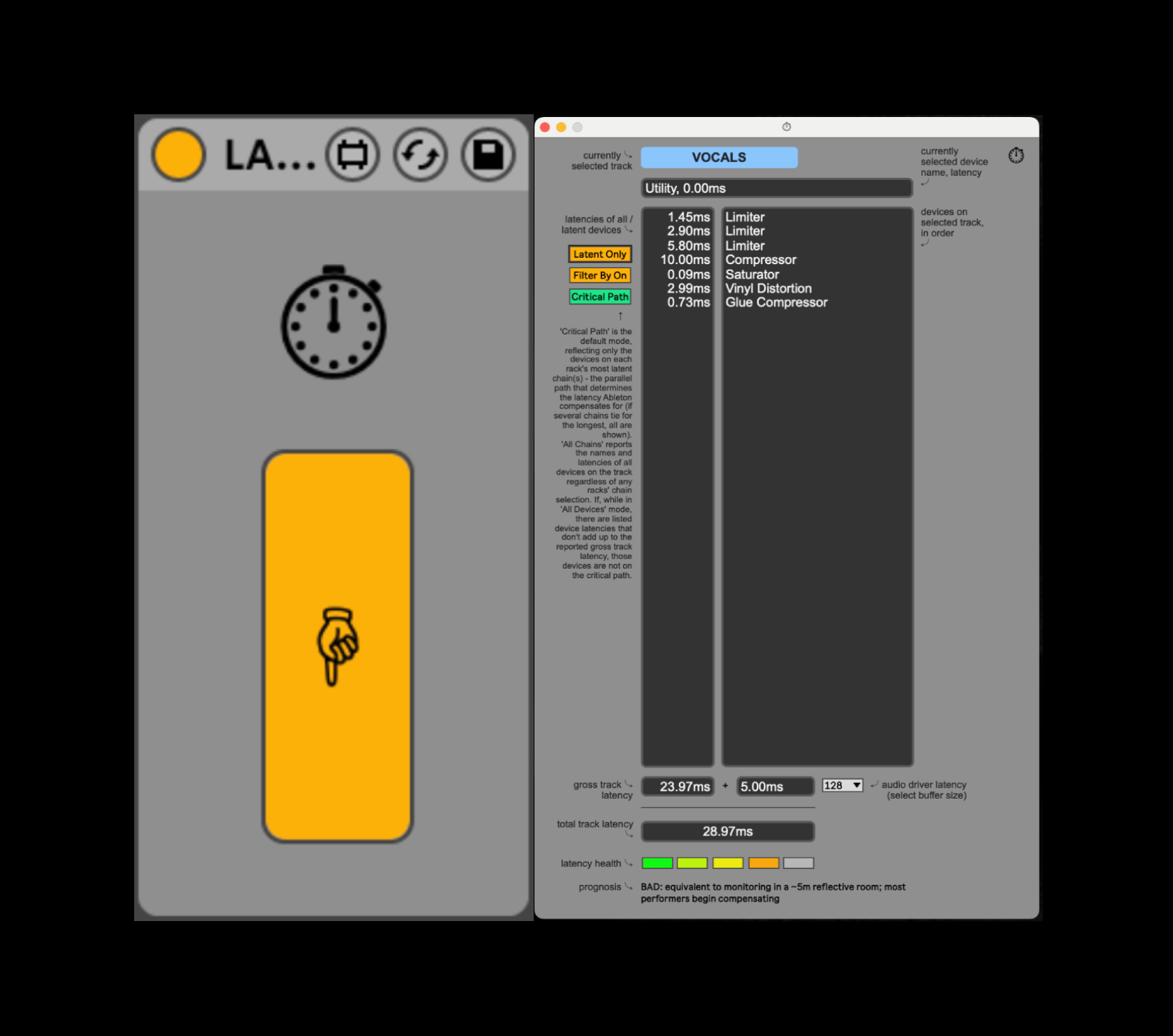
| Description: | Say hi to Latency Friend - an efficient solution for troubleshooting latency issues during real-time monitoring sessions in Ableton Live. Latency Friend is a dynamic, diagnostic track latency / PDC calculator. Load it anywhere into the set and press the pop-up window button. You will see a floating display containing a list of devices, their latencies, and the total latency; this is your definitive latency breakdown. With Latency Friend, you can determine and make the compromises you need to make at a glance, rather than relying solely on Ableton's native display, and consigning yourself to a tedious device-by-device mouseover pilgrimage. The device has: * A live, per-track breakdown, following the selected track and recalculating instantly * A synchronised two-column list: latencies (left), device names (right) * Total device latency, audio-driver latency, and the grand total * A green-to-red health indicator and prognosis, with general (!) guidelines on the performability of each latency profile * Recursive capability, through nested racks and parallel chains * Dynamic recalculation; updates are made as you add/remove devices, toggle on/off, mute/solo chains, or make in-device latency changes (such as the lookahead on a Limiter) Plus three display toggles: * Critical Path / All Chains — either show only the longest, latency-setting chain in a rack, or every device across all chains. Parallel chains in a rack don't add up; only the longest one sets the latency. Critical Path lists just that latency-determining chain (the real culprits); All Chains lists every device across every chain as a full inventory. * Active Only / All — hide what's switched off, or list everything * Latent Only / All — hide 0.00 ms devices, or show them all Notes: You must set the buffer size menu to match your actual buffer settings manually. The device is built for live performers running heavy real-time effects. This intended use case assumes that the master delay compensation setting, Options > Delay Compensation, is set to Off. The audio driver figure is calculated from pre-interface universals: buffer size and current sampling rate. It does not (and cannot) factor in your interface's own hardware round-trip. The device adds some LOM query and CPU overhead. For heavy sets where this becomes an issue, consider it a temporary diagnostic tool and delete when done. |
Details
| Live Version Used: | 12.0.5 |
| Max Version Used: | 8.6.2 |
| Date Added: | Jun 08 2026 23:20:43 |
| Date Last Updated: | Jun 09 2026 10:24:46 |
| Downloads: | 0 |
| Website: | https://aerogel249.gumroad.com/l/krdupw |
| ⓘ License: | Commercial |
Average Rating
Log in to rate this device |
-n/a- |
Login to comment on this device.
Browse the full library